"/><stop offset="1" stop-color="rgb(0, 0, 0)"/></linearGradient></defs><g d="M 170.193 26.712 C 170.703 22.612 170.804 18.395 170.488 14.276 C 169.882 6.411 164.686 1.017 156.951 0.338 C 151.591 -0.134 146.167 0.083 140.773 0 C 140.7 0 140.624 0.093 140.508 0.171 L 140.508 64.705 L 149.995 64.705 L 149.995 40.573 C 150.583 40.535 150.997 40.494 151.411 40.489 C 153.767 40.461 153.76 40.466 154.535 42.641 C 157.05 49.685 159.56 56.733 162.108 63.765 C 162.254 64.167 162.683 64.763 162.994 64.77 C 166.203 64.844 169.415 64.816 172.804 64.816 C 169.271 56.028 165.827 47.463 162.363 38.843 C 167.34 36.199 169.559 31.803 170.193 26.713 Z M 160.479 27.124 C 159.739 31.22 157.363 33.182 153.199 33.389 C 152.182 33.439 151.161 33.396 150.058 33.396 L 150.058 7.019 C 152.674 6.913 155.189 6.981 157.484 8.242 C 159.446 9.317 160.393 11.155 160.658 13.282 C 161.234 17.897 161.307 22.533 160.479 27.124 Z M 110.607 0 L 98.623 64.748 L 108.546 64.748 C 109.127 60.904 109.703 57.086 110.296 53.185 C 110.892 53.155 111.4 53.107 111.91 53.105 C 114.447 53.097 116.985 53.079 119.52 53.107 C 122.995 53.147 122.109 52.67 122.682 55.877 C 123.207 58.811 123.616 61.766 124.073 64.692 L 133.964 64.692 L 121.949 0 Z M 111.44 45.686 C 112.967 34.95 114.497 24.215 116.028 13.479 C 116.205 13.463 116.382 13.451 116.556 13.433 C 118.073 24.134 119.589 34.841 121.124 45.686 Z M 207.282 45.585 C 206.183 40.866 203.388 37.025 200.378 33.346 C 196.772 28.938 193.124 24.564 189.54 20.138 C 187.69 17.85 187.053 15.168 187.306 12.262 C 187.503 10.01 188.808 8.348 190.808 7.805 C 194.045 6.932 196.709 8.219 197.911 11.343 C 198.3 12.358 198.565 13.453 198.676 14.535 C 198.896 16.658 198.964 18.797 199.095 20.945 L 206.335 20.945 C 207.14 17.608 207.678 14.318 207.186 10.944 C 206.431 5.76 203.585 2.278 198.522 0.806 C 194.876 -0.257 191.146 -0.288 187.49 0.826 C 183.344 2.088 180.496 4.796 179.079 8.889 C 177.726 12.799 177.9 16.749 179.18 20.64 C 180.463 24.544 182.895 27.761 185.513 30.874 C 189.028 35.056 192.525 39.258 195.878 43.571 C 197.858 46.116 198.59 49.166 198.323 52.391 C 198.068 55.471 196.558 57.082 193.692 57.481 C 190.601 57.911 188.356 56.716 187.329 53.913 C 186.894 52.721 186.629 51.436 186.508 50.173 C 186.311 48.136 186.296 46.078 186.202 43.954 L 178.476 43.954 C 178.317 47.055 177.963 50.108 178.059 53.151 C 178.155 56.241 179.223 59.074 181.634 61.241 C 184.859 64.135 188.773 64.851 192.927 64.779 C 197.522 64.698 201.699 63.509 204.719 59.804 C 208.163 55.567 208.458 50.651 207.282 45.585 Z M 66.028 7.481 L 74.585 7.481 C 76.408 7.481 76.411 7.484 76.411 9.31 L 76.411 64.654 L 86.332 64.654 L 86.332 7.441 L 96.572 7.441 L 96.572 0 L 66.027 0 L 66.027 7.481 Z M 51.69 0.03 L 6.296 0.03 C 4.626 0.03 3.025 0.693 1.844 1.873 C 0.663 3.054 0 4.656 0 6.325 L 0 58.412 C 0 60.082 0.663 61.683 1.843 62.864 C 3.024 64.045 4.625 64.708 6.295 64.707 L 51.693 64.707 C 55.169 64.706 57.986 61.888 57.988 58.412 L 57.988 6.322 C 57.986 2.846 55.167 0.03 51.691 0.03 Z M 58.066 44.404 L 23.778 64.221 L 9.5 36.678 L 18.35 36.678 L 9.5 17.5 L 36.26 17.5 L 40.69 27.168 L 48.644 27.088 L 58.064 44.404 Z M 12.15 20.576 L 33.613 20.576 C 35.075 20.575 36.26 19.389 36.261 17.927 L 36.261 17.65 C 36.261 16.187 35.076 15.001 33.613 15 L 12.149 15 C 10.686 15.001 9.501 16.187 9.501 17.65 L 9.501 17.927 C 9.502 19.39 10.687 20.575 12.15 20.576 Z M 45.996 24.592 L 24.532 24.592 C 23.07 24.593 21.885 25.779 21.884 27.241 L 21.884 27.518 C 21.884 28.981 23.069 30.167 24.532 30.168 L 45.995 30.168 C 47.459 30.168 48.645 28.982 48.645 27.518 L 48.645 27.241 C 48.645 25.777 47.459 24.591 45.995 24.591 Z M 36.261 37.105 L 36.261 36.827 C 36.26 35.365 35.075 34.18 33.613 34.179 L 12.15 34.179 C 10.687 34.179 9.501 35.364 9.5 36.827 L 9.5 37.105 C 9.501 38.568 10.687 39.754 12.15 39.754 L 33.613 39.754 C 35.075 39.753 36.26 38.567 36.261 37.105 Z M 45.996 43.769 L 30.108 43.769 C 28.645 43.769 27.459 44.954 27.458 46.417 L 27.458 46.695 C 27.459 48.158 28.645 49.344 30.108 49.344 L 45.996 49.344 C 47.459 49.343 48.644 48.157 48.644 46.694 L 48.644 46.417 C 48.643 44.955 47.458 43.769 45.996 43.768 Z" fill="transparent" height="64.8215759501361px" id="QfcaI9IOZ" width="207.90555214854942px"><path d="M 170.193 26.712 C 170.703 22.612 170.804 18.395 170.488 14.276 C 169.882 6.411 164.686 1.017 156.951 0.338 C 151.591 -0.134 146.167 0.083 140.773 0 C 140.7 0 140.624 0.093 140.508 0.171 L 140.508 64.705 L 149.995 64.705 L 149.995 40.573 C 150.583 40.535 150.997 40.494 151.411 40.489 C 153.767 40.461 153.76 40.466 154.535 42.641 C 157.05 49.685 159.56 56.733 162.108 63.765 C 162.254 64.167 162.683 64.763 162.994 64.77 C 166.203 64.844 169.415 64.816 172.804 64.816 C 169.271 56.028 165.827 47.463 162.363 38.843 C 167.34 36.199 169.559 31.803 170.193 26.713 Z M 160.479 27.124 C 159.739 31.22 157.363 33.182 153.199 33.389 C 152.182 33.439 151.161 33.396 150.058 33.396 L 150.058 7.019 C 152.674 6.913 155.189 6.981 157.484 8.242 C 159.446 9.317 160.393 11.155 160.658 13.282 C 161.234 17.897 161.307 22.533 160.479 27.124 Z M 110.607 0 L 98.623 64.748 L 108.546 64.748 C 109.127 60.904 109.703 57.086 110.296 53.185 C 110.892 53.155 111.4 53.107 111.91 53.105 C 114.447 53.097 116.985 53.079 119.52 53.107 C 122.995 53.147 122.109 52.67 122.682 55.877 C 123.207 58.811 123.616 61.766 124.073 64.692 L 133.964 64.692 L 121.949 0 Z M 111.44 45.686 C 112.967 34.95 114.497 24.215 116.028 13.479 C 116.205 13.463 116.382 13.451 116.556 13.433 C 118.073 24.134 119.589 34.841 121.124 45.686 Z M 207.282 45.585 C 206.183 40.866 203.388 37.025 200.378 33.346 C 196.772 28.938 193.124 24.564 189.54 20.138 C 187.69 17.85 187.053 15.168 187.306 12.262 C 187.503 10.01 188.808 8.348 190.808 7.805 C 194.045 6.932 196.709 8.219 197.911 11.343 C 198.3 12.358 198.565 13.453 198.676 14.535 C 198.896 16.658 198.964 18.797 199.095 20.945 L 206.335 20.945 C 207.14 17.608 207.678 14.318 207.186 10.944 C 206.431 5.76 203.585 2.278 198.522 0.806 C 194.876 -0.257 191.146 -0.288 187.49 0.826 C 183.344 2.088 180.496 4.796 179.079 8.889 C 177.726 12.799 177.9 16.749 179.18 20.64 C 180.463 24.544 182.895 27.761 185.513 30.874 C 189.028 35.056 192.525 39.258 195.878 43.571 C 197.858 46.116 198.59 49.166 198.323 52.391 C 198.068 55.471 196.558 57.082 193.692 57.481 C 190.601 57.911 188.356 56.716 187.329 53.913 C 186.894 52.721 186.629 51.436 186.508 50.173 C 186.311 48.136 186.296 46.078 186.202 43.954 L 178.476 43.954 C 178.317 47.055 177.963 50.108 178.059 53.151 C 178.155 56.241 179.223 59.074 181.634 61.241 C 184.859 64.135 188.773 64.851 192.927 64.779 C 197.522 64.698 201.699 63.509 204.719 59.804 C 208.163 55.567 208.458 50.651 207.282 45.585 Z M 66.028 7.481 L 74.585 7.481 C 76.408 7.481 76.411 7.484 76.411 9.31 L 76.411 64.654 L 86.332 64.654 L 86.332 7.441 L 96.572 7.441 L 96.572 0 L 66.027 0 L 66.027 7.481 Z M 51.69 0.03 L 6.296 0.03 C 4.626 0.03 3.025 0.693 1.844 1.873 C 0.663 3.054 0 4.656 0 6.325 L 0 58.412 C 0 60.082 0.663 61.683 1.843 62.864 C 3.024 64.045 4.625 64.708 6.295 64.707 L 51.693 64.707 C 55.169 64.706 57.986 61.888 57.988 58.412 L 57.988 6.322 C 57.986 2.846 55.167 0.03 51.691 0.03 Z" fill="rgb(109, 51, 170)" height="64.8215759501361px" id="DhxUqY6MU" width="207.90555214854942px"/><g opacity="0.1"><path d="M 48.566 26.904 L 14.278 46.721 L 0 19.178 L 8.85 19.178 L 0 0 L 26.76 0 L 31.19 9.668 L 39.144 9.588 L 48.564 26.904 Z" fill="url(%23KtpMvl41A-3187482773-linear-gradient)" height="46.721000000000004px" id="KtpMvl41A" transform="translate(9.5 17.5)" width="48.565999999999974px"/></g><path d="M 2.65 5.576 L 24.113 5.576 C 25.575 5.575 26.76 4.389 26.761 2.927 L 26.761 2.65 C 26.761 1.187 25.576 0.001 24.113 0 L 2.649 0 C 1.186 0.001 0.001 1.187 0.001 2.65 L 0.001 2.927 C 0.002 4.39 1.187 5.575 2.65 5.576 Z M 36.496 9.592 L 15.032 9.592 C 13.57 9.593 12.385 10.779 12.384 12.241 L 12.384 12.518 C 12.384 13.981 13.569 15.167 15.032 15.168 L 36.495 15.168 C 37.959 15.168 39.145 13.982 39.145 12.518 L 39.145 12.241 C 39.145 10.777 37.959 9.591 36.495 9.591 Z M 26.761 22.105 L 26.761 21.827 C 26.76 20.365 25.575 19.18 24.113 19.179 L 2.65 19.179 C 1.187 19.179 0.001 20.364 0 21.827 L 0 22.105 C 0.001 23.568 1.187 24.754 2.65 24.754 L 24.113 24.754 C 25.575 24.753 26.76 23.567 26.761 22.105 Z M 36.496 28.769 L 20.608 28.769 C 19.145 28.769 17.959 29.954 17.958 31.417 L 17.958 31.695 C 17.959 33.158 19.145 34.344 20.608 34.344 L 36.496 34.344 C 37.959 34.343 39.144 33.157 39.144 31.694 L 39.144 31.417 C 39.143 29.955 37.958 28.769 36.496 28.768 Z" fill="rgb(255, 255, 255)" height="34.343999649047866px" id="J4IgCjz6D" transform="translate(9.5 15)" width="39.14499982452404px"/></g></svg>)
Context
TIMELINE
Dec 2023 - Mar 2024
INDUSTRY
B2B SaaS
ROLE
Product Designer
TEAM
Founders, Developers, Me
I led the 0→1 design of Asimov, an AI assistant by Tars deployed in teams’ Slack workspaces to help them access shared knowledge, retrieve past conversations and automate common Slack-based workflows. As the lead product designer, I worked closely with the founders, front-end and back-end developers and early users to shape the product from concept through beta.
Beyond designing the Slack experience, the core work focused on designing the control layer behind Asimov, allowing team admins to manage the datasets feeding Asimov's LLM model, integrate third-party applications and configure RBAC (Role-Based Access Control), while maintaining visibility into Asimov’s performance.
impact
early impact of asimov among pilot teams
82.3%
Adoption in early pilot teams
Measured by the number of companies who installed Asimov compared to those who had joined the beta waitlist.
~74%
Reduction in task-related queries
From ICs, as reported by team managers after introducing Asimov into their Slack team workspaces.
86%
positive feedback from teams
Who were part of the beta release and successfully incorporated Asimov into their team workspace.
Design System Foundations
Interaction Patterns That Shaped the Product
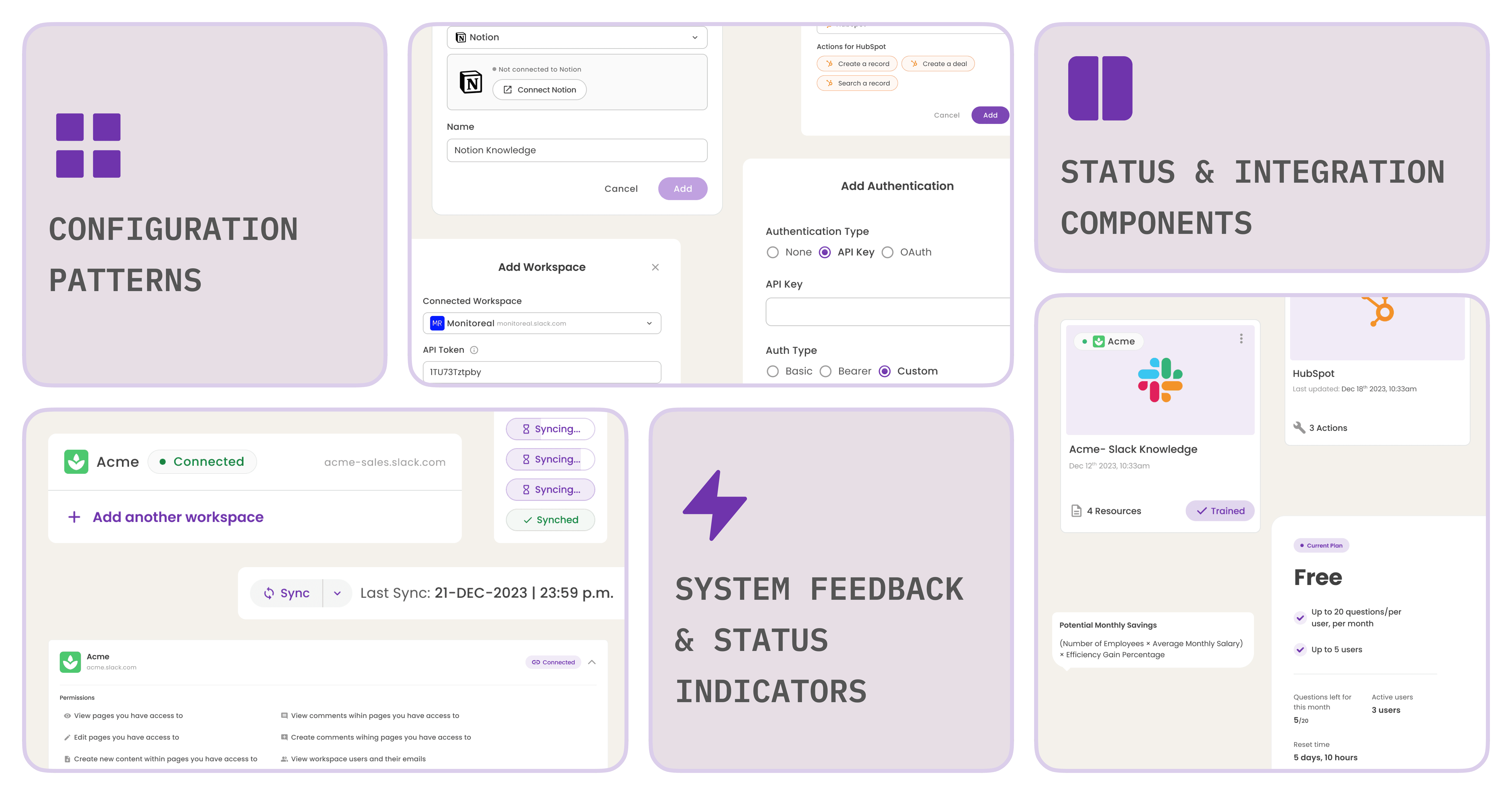
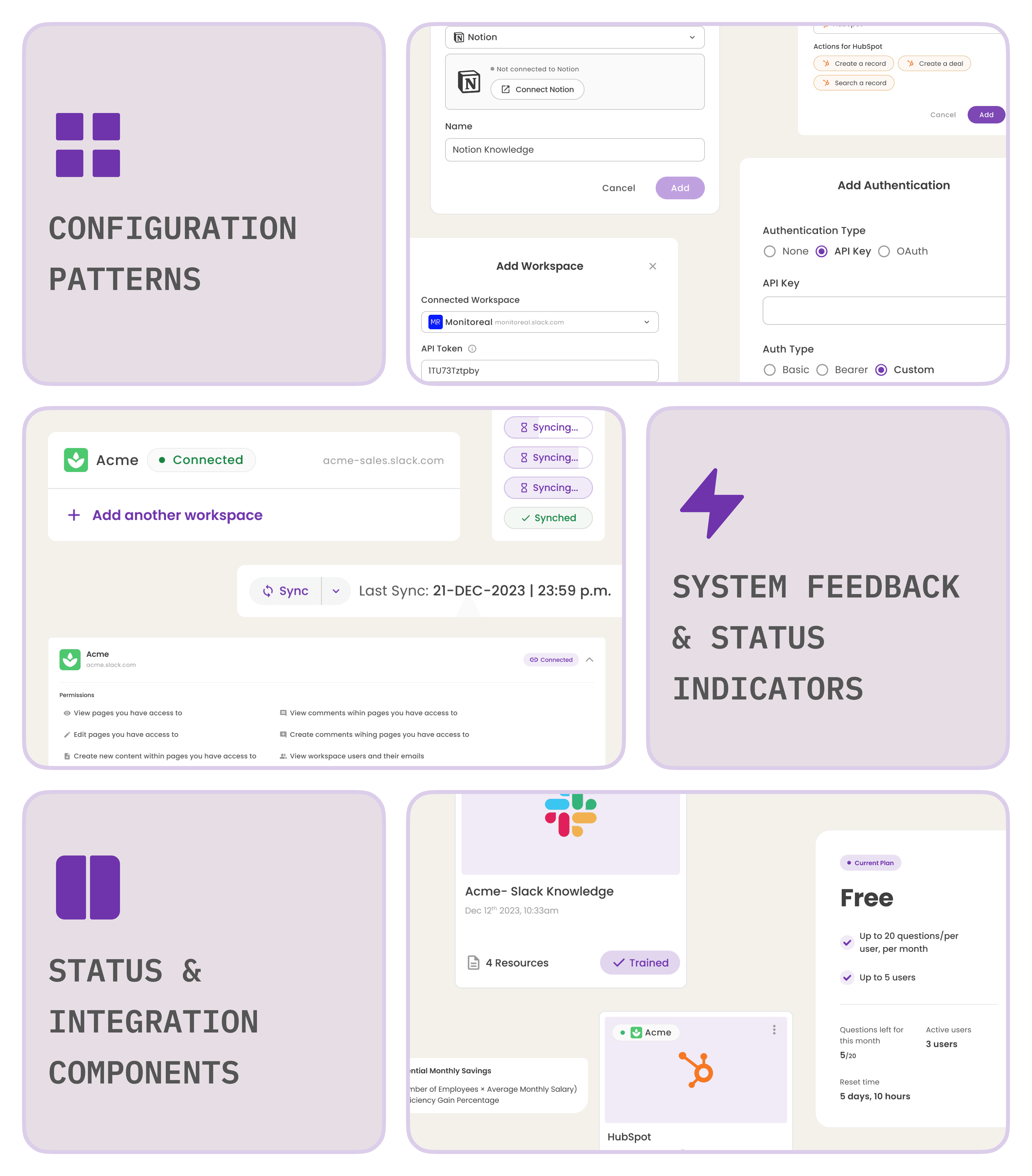
As the product evolved, many of the interaction patterns and UI components I designed for Asimov contributed to the growing Tars design system and were later reused across the company’s product suite. I designed these components to work consistently across desktop and mobile surfaces, ensuring the system could scale as the product expanded.
Market requirement
Designing an AI Assistant That Teams Could Control
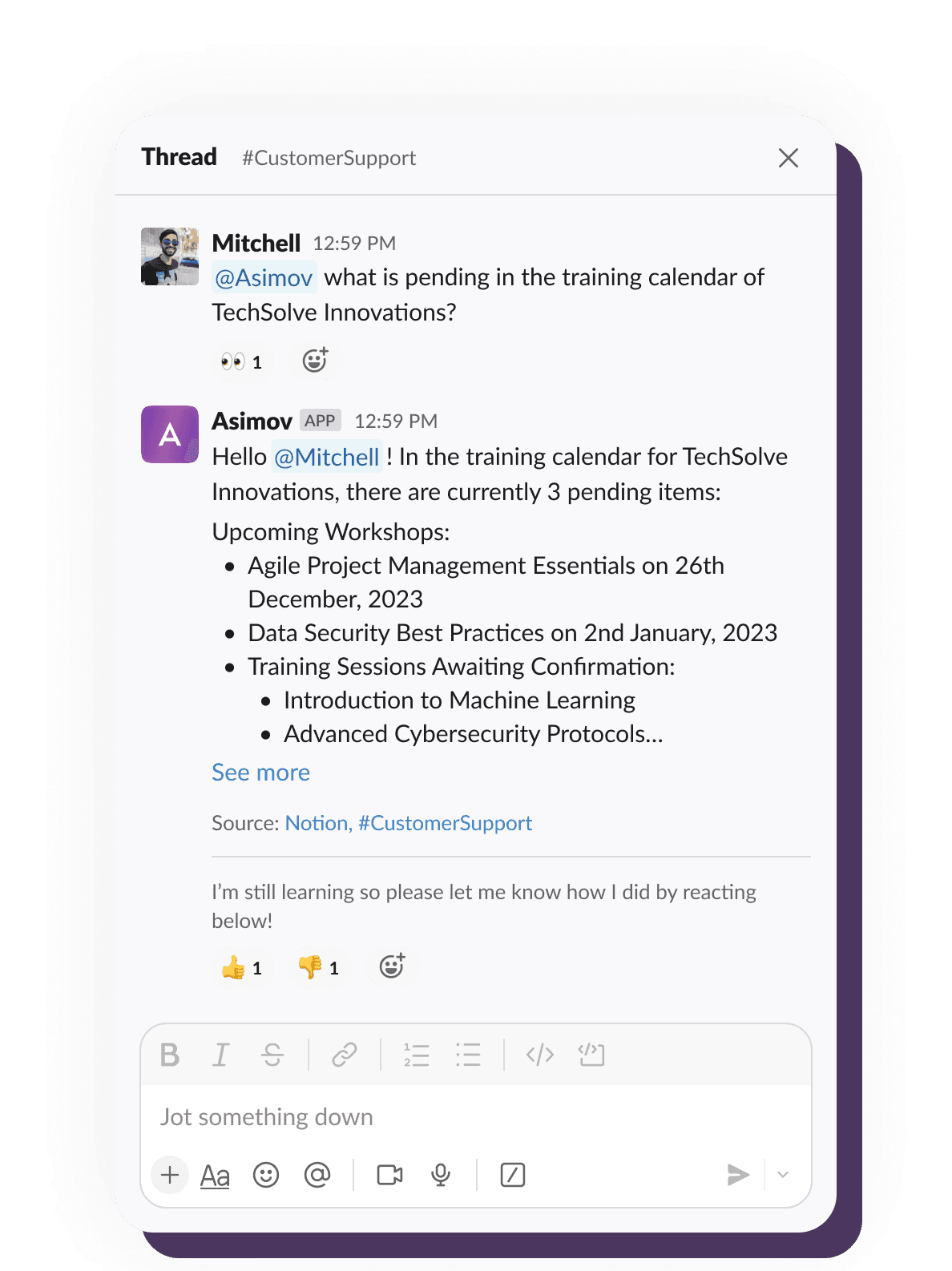
Example of Asimov retrieving information from connected knowledge sources and presenting it in a structured response within Slack.
Research and analysis
What Teams Needed From the System
While the Slack interaction was user-facing, the real complexity of Asimov lived in the administrative layer behind it. To design this control layer, I needed to understand how teams managed knowledge, permissions and integrations across their existing tools.
I conducted interviews with team leads, CXOs and individual contributors across early pilot teams. These conversations helped uncover patterns in how teams were organizing and sharing information, and where breakdowns would occur when knowledge needed to scale across the organization.
Across 26+ interviews, three themes consistently emerged.
KNOWLEDGE LIVED ACROSS MULTIPLE SYSTEMS
Teams stored knowledge in external documentation platforms, CRMs, shared drives. For Asimov to be useful, it would need to ingest and retrieve information across these systems rather than relying solely on Slack messages.
While teams were excited that Asimov could retrieve information quickly, they also needed confidence that it would access the right sources and respect internal permissions. Admins needed to configure knowledge sources.
NEED FOR VISIBILITY INTO ASIMOV'S RESPONSE QUALITY
Teams wanted to understand how the Asimov arrived at answers, if it was helping and whether it was referencing reliable information. Without visibility into the assistant’s behavior, trust in the system would quickly erode.
final design
How Teams Configure and Use Asimov
1
Connect the Workspace
Once teams receive access to Asimov, the first step is connecting it as an app within their Slack workspace. This allows the assistant to operate directly inside conversations, where most team collaboration already happens.
From Slack, teams can access the Asimov configuration settings and navigate to the web dashboard, which acts as the control layer behind the assistant. While Slack is where teams interact with Asimov, the dashboard is where administrators configure what the system knows and how it behaves.
Connecting the team’s Slack workspace allows Asimov to operate directly within conversations.
2
Define the Knowledge Base
After connecting Slack, administrators begin shaping the knowledge that Asimov can reference. Channels can be added to Asimov’s dataset so the assistant can retrieve insights from past conversations and shared discussions.
To keep the assistant up to date, admins can enable auto-sync so new messages are periodically incorporated into the knowledge base. Metadata such as the number of messages retrieved from each channel helps teams maintain transparency into what information Asimov is learning from
Connecting the Slack channels as resources to train Asimov on the team's data.
Since team knowledge rarely lives in Slack alone, administrators can also connect external sources such as Notion, Google Drive, and other documentation platforms. This allows Asimov to pull information from across the team’s ecosystem rather than relying on a single source.
3
Extend the System with Integrations
Beyond knowledge retrieval, Asimov also needed awareness of the tools teams used in their day-to-day workflows. Through the integrations hub, administrators can connect platforms such as Google Drive, HubSpot, and other internal systems.
This creates a unified layer where teams can view, manage, and control how Asimov interacts with external tools, ensuring the assistant has the context needed to surface accurate information.
The App Integrations hub where admins can connect and disconnect multiple apps.
4
Enable Automated Actions
With knowledge sources and integrations in place, Asimov can move beyond answering questions to executing tasks.
Administrators can configure what actions the assistant is allowed to perform through connected applications. From updating a deal in HubSpot to creating a note in Notion, Asimov can automate common workflows directly within Slack, reducing the need for teams to switch between tools.
Teams can also build custom tools, allowing Asimov to support workflows unique to their organization. By combining integrations with configurable actions, the assistant becomes more than a search tool, it becomes an active collaborator within the team’s workflow.
Setting actions that Asimov can perform and feature to create custom tools.
With knowledge sources and integrations in place, Asimov can move beyond answering questions to executing tasks.
Administrators can configure what actions the assistant is allowed to perform through connected applications. From updating a deal in HubSpot to creating a note in Notion, Asimov can automate common workflows directly within Slack, reducing the need for teams to switch between tools.
Teams can also build custom tools, allowing Asimov to support workflows unique to their organization. By combining integrations with configurable actions, the assistant becomes more than a search tool, it becomes an active collaborator within the team’s workflow.
design process
DESIGNING ASIMOV'S CONTROL LAYER
approach
Designing Asimov’s administrative layer meant tackling multiple complex problems at once. Rather than designing and then shipping the entire system upfront, the Asimov team decided to break the work into smaller features that could be designed, shipped and tested quickly. This allowed Asimov to launch early for teams in beta while we continued improving the product based on real usage and feedback. The process became a cycle of designing, shipping and iterating, which allowed the product to evolve alongside how teams actually used it.
MANAGING KNOWLEDGE SOURCES
The first feature I designed focused on how teams would connect existing datasets into Asimov. For the initial release, we wanted to keep the workflow simple. I designed a dashboard where teams could view the Slack channels connected to Asimov and add more channels to feed its dataset. We shipped this core feature alongside Asimov’s conversational capability on Slack.
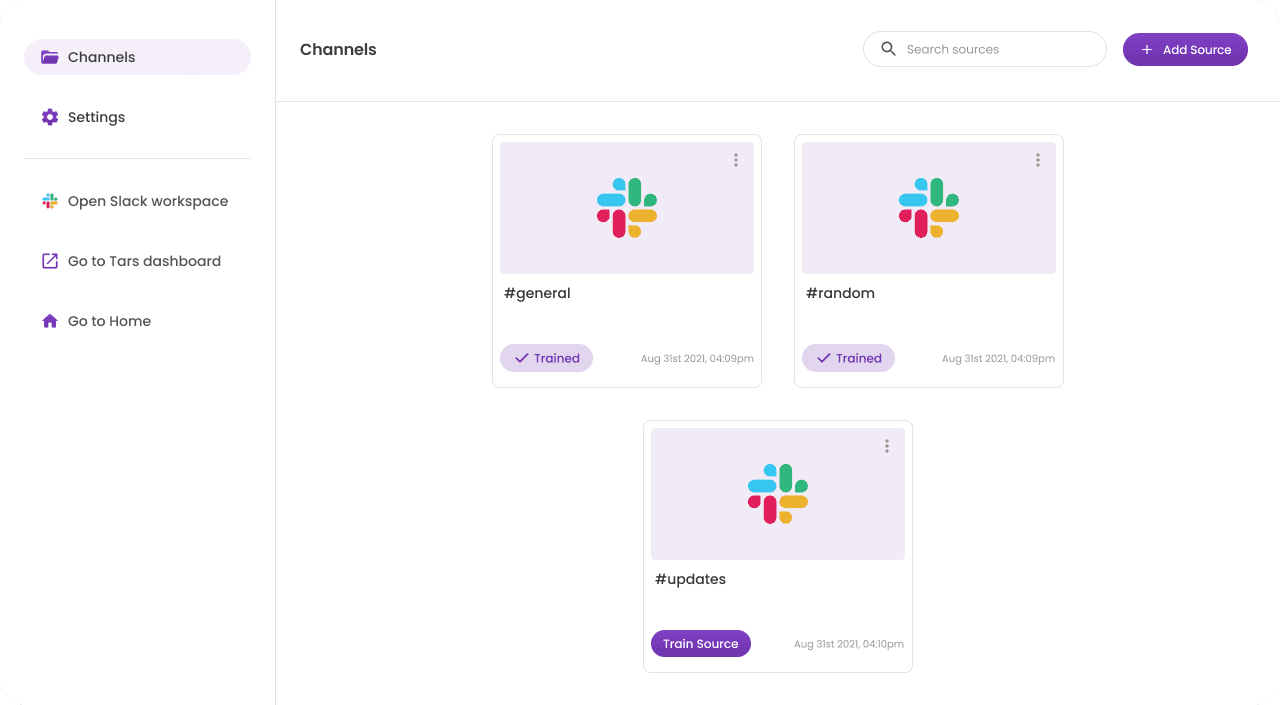
First iteration of Asimov with just Slack channels connected as knowledge sources.
However, relying solely on Slack as the knowledge source quickly proved limiting, especially for teams whose information also lived across documentation platforms and shared drives.
In subsequent iterations, I evolved the dashboard into a 'Knowledge Base Management System' that allowed administrators to connect and manage multiple sources.
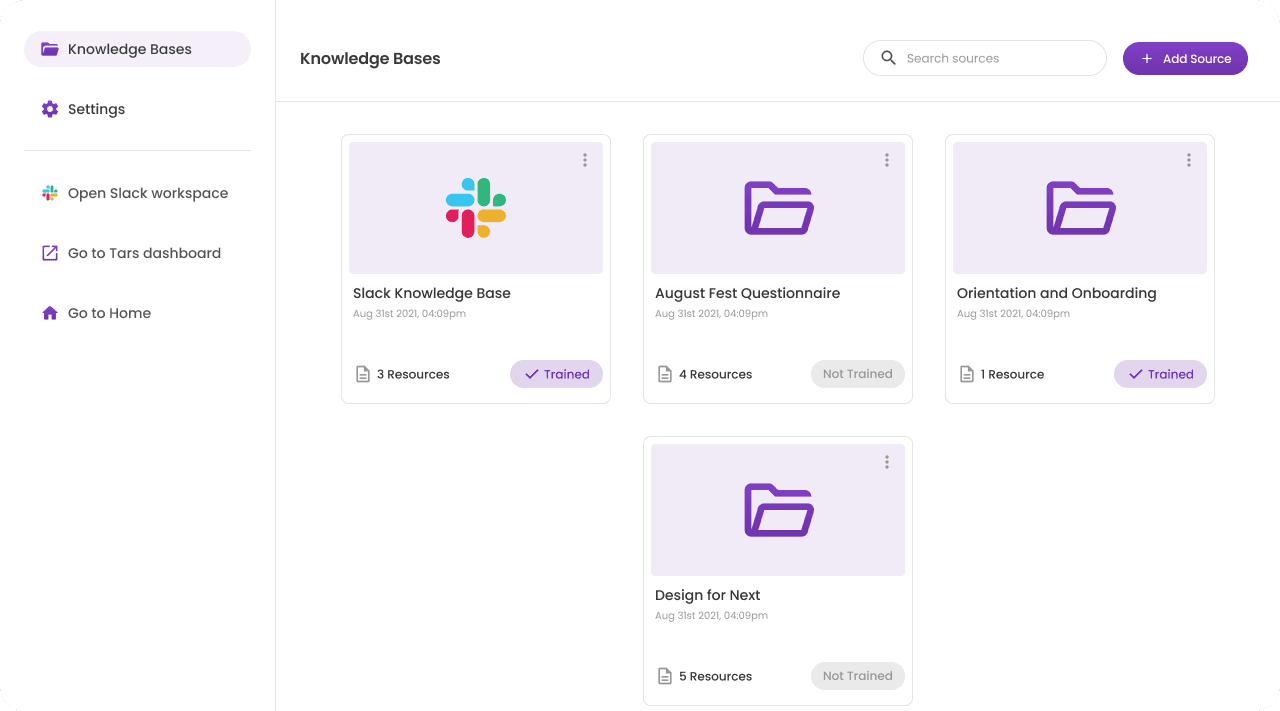
Second iteration with Slack and local files connected to Asimov.
incorporating advanced integrations
Since teams stored knowledge across multiple platforms, there was a need for a feature where admins could configure these connections. I designed a dedicated integrations section that allowed administrators to connect external tools such as Google Drive, OneDrive, HubSpot and others, enabling Asimov to retrieve and reference information across sources.
In subsequent iterations, this hub was also designed to serve as the source of truth for the Actions section. Administrators could not only connect third-party applications but also control the permissions Asimov had when accessing these tools. Full control over what Asimov could access remained with the admins, they could disconnect an application at any time.
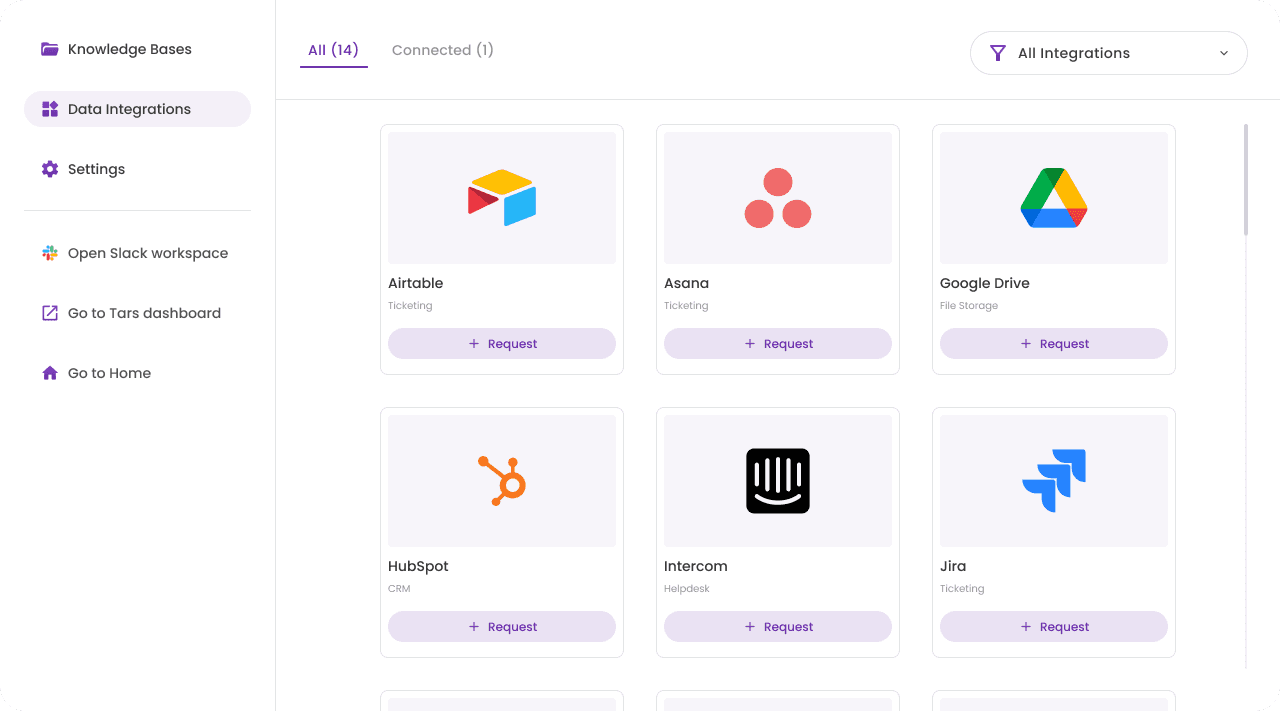
First iteration of the Data Integration hub.
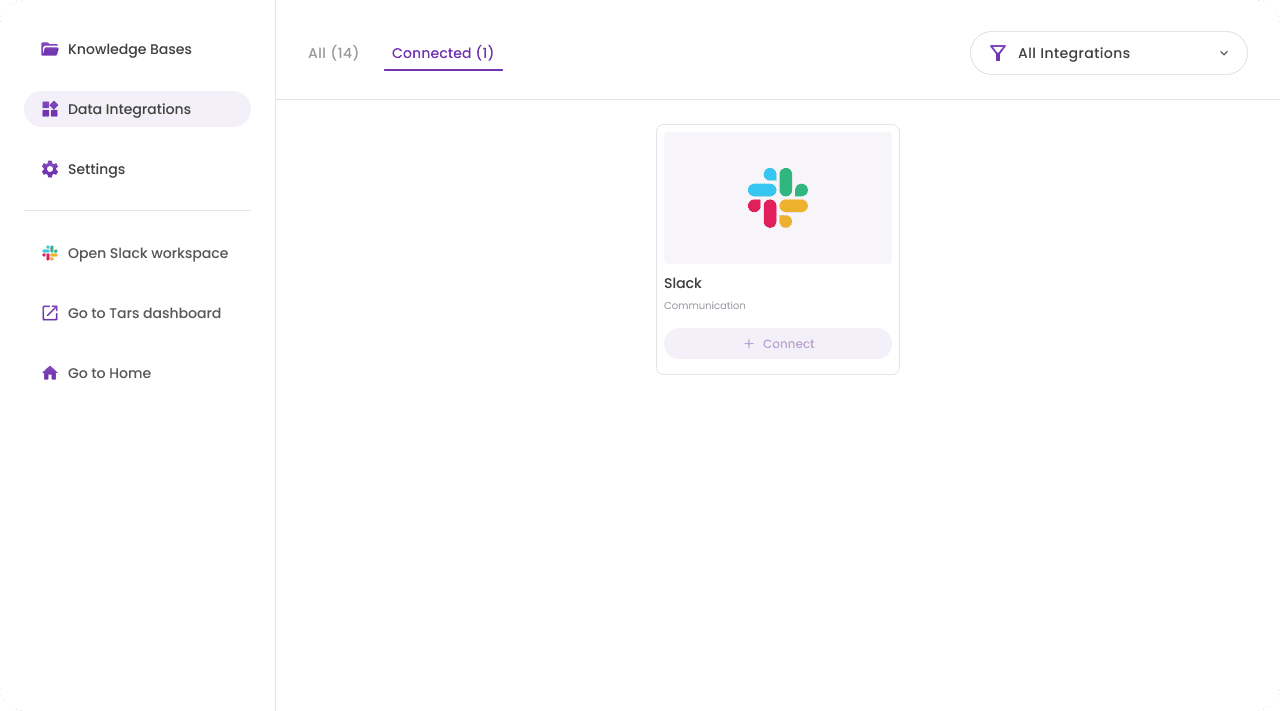
The connected sub-section showing Asimov's current connections.
Designing the actions feature
Over time, we began receiving requests from teams to define custom tools that Asimov could execute. This feature was more complex, so I needed some grounding before beginning the design. I started by studying shipped implementations of this use case. In early 2024, this included OpenAI’s GPT Builder, whose advanced configurations closely matched what teams were asking for.
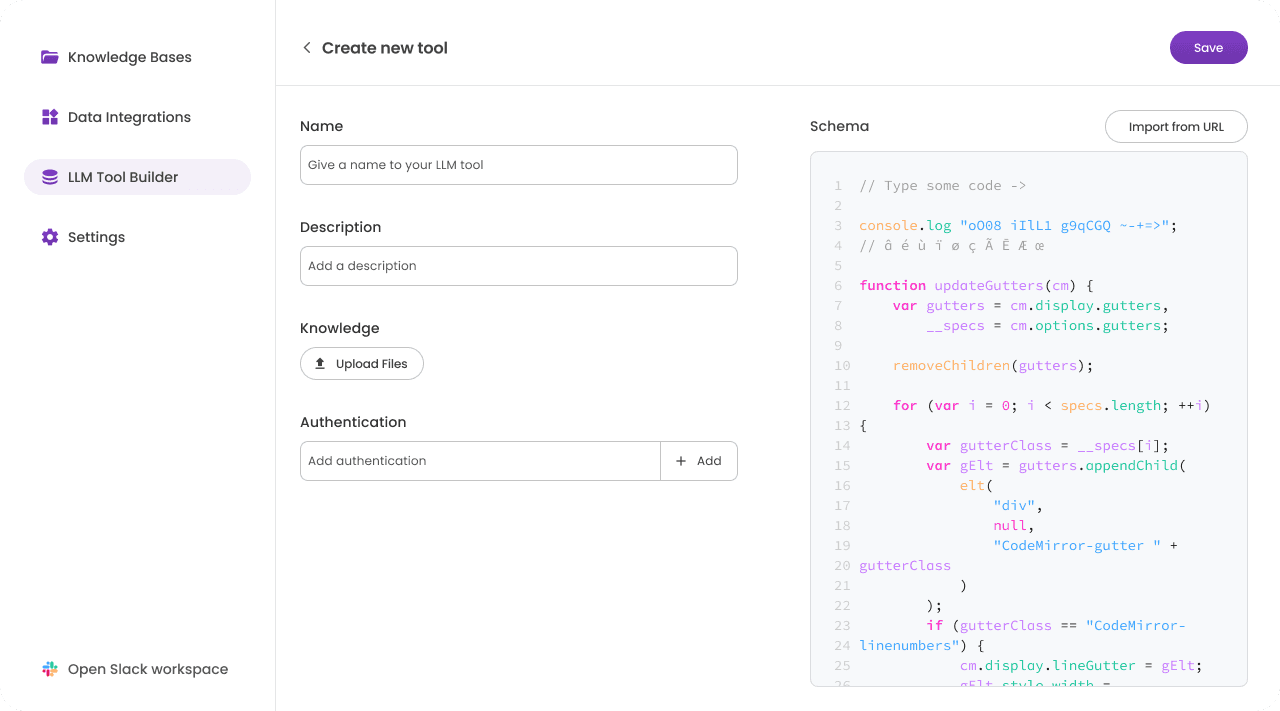
First iteration of the Actions feature, previously called 'LLM Tool Builder'.
The design evolved through several iterations as I explored different layouts and levels of LLM configuration, while ensuring the experience remained understandable for non-technical users. The first version allowed teams to add custom tools by configuring the tool’s schema and authentication.
In the next release, we expanded the feature’s capabilities. Since the integrations section had already been shipped, and our interviews revealed that teams often performed actions within third-party tools, we introduced the ability for Asimov to execute those actions. For example, a team member could ask Asimov to update a client’s deal in HubSpot and add notes based on a Slack conversation, saving time switching between applications.
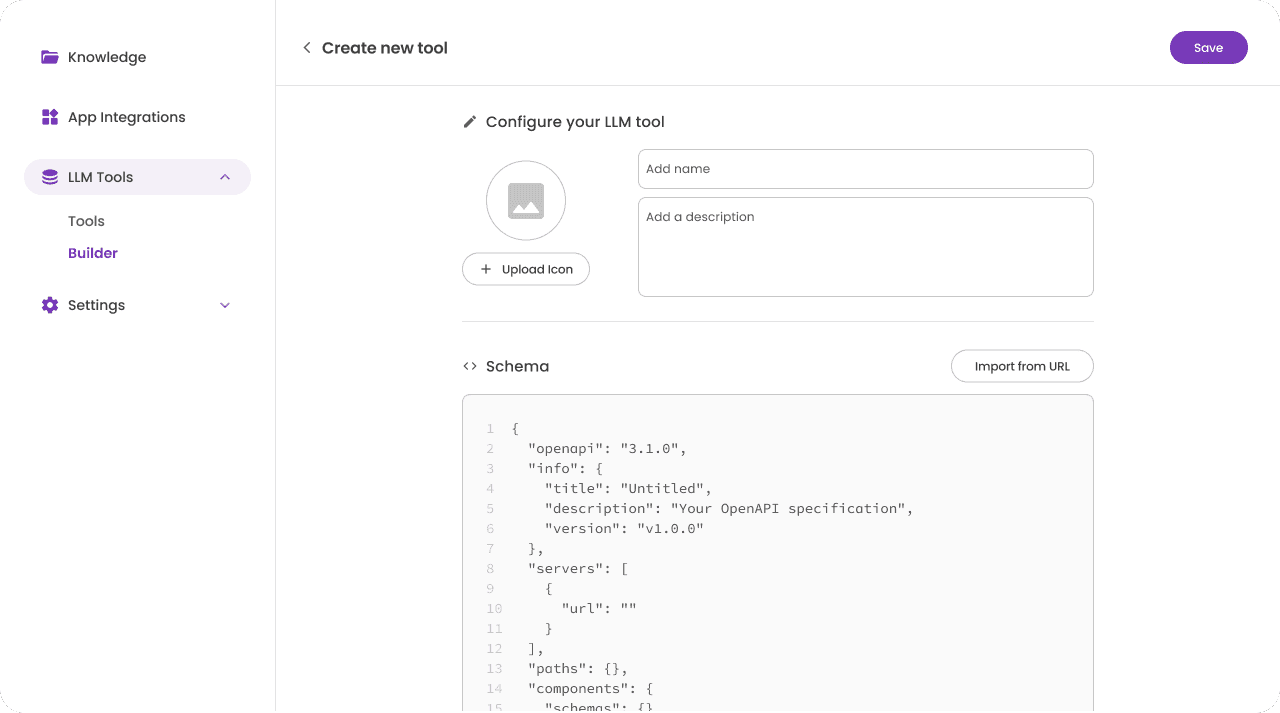
Subsequent iteration of the Actions builder feature, called LLM Tools - Builder.
The challenge with this particular feature, for me as the designer, was ensuring teams could extend Asimov's capabilities and customize it to their needs, without creating overly complex configurations.
Early RBAC Considerations
As the first version of Asimov was released, teams began experimenting with it. Access control quickly became a concern. With additional data sources now being connected to Asimov, team leaders and CXOs needed confidence that the assistant would respect internal permissions and only surface information appropriate for different roles.
I went back to the drawing board and after several conversations with the developers, we realized that implementing a full role-based access system at the dashboard level would require deeper backend considerations. As a result, we explored an early workaround.
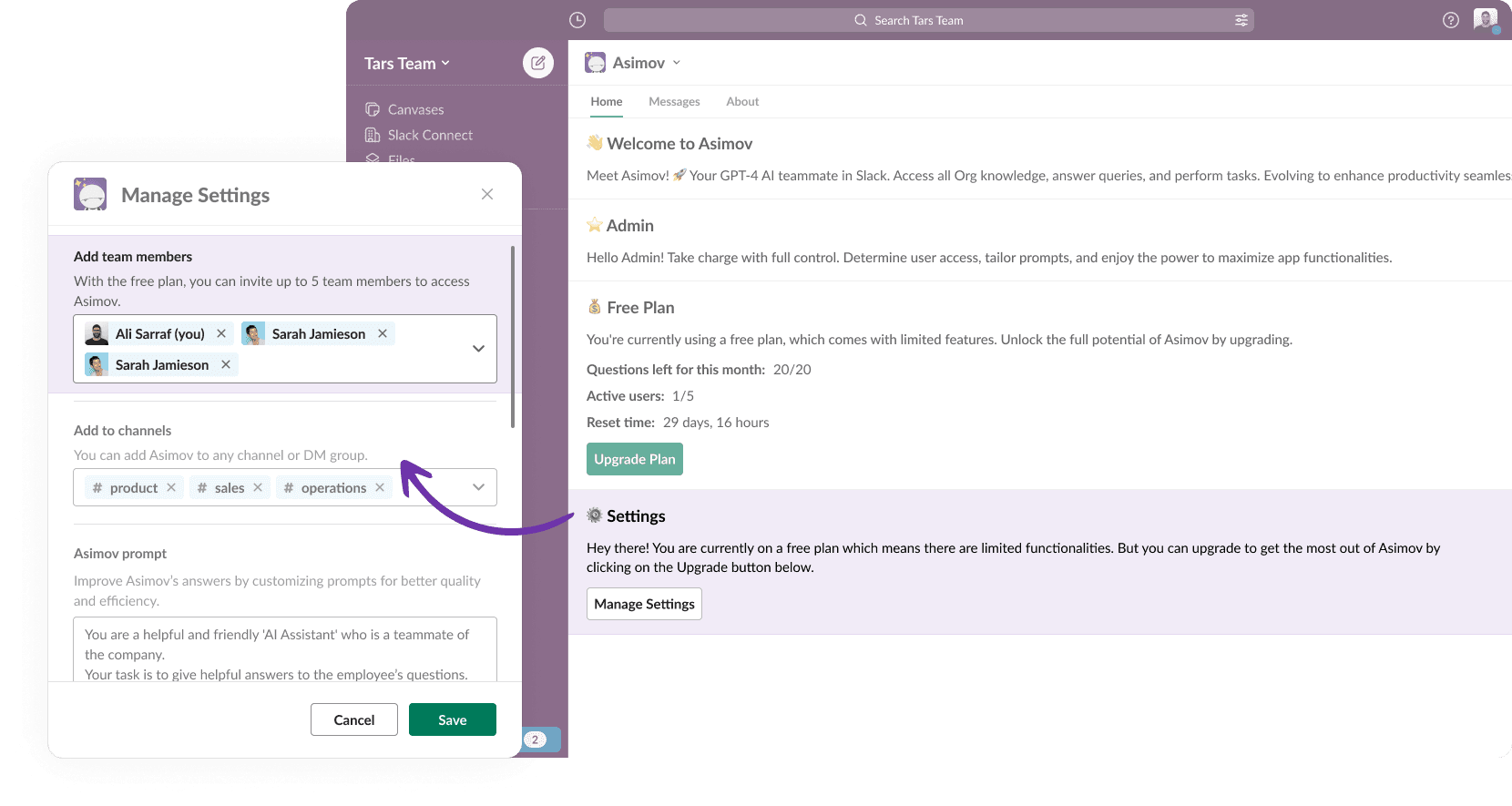
Team member access settings via the Slack interface
This was introduced directly within Asimov’s Slack settings to manage access during the beta phase. With this approach, Asimov admins could control who had access to the system. We also introduced multiple instances of Asimov so teams could deploy it across different organizational levels — ICs, team leads, executives, and CXOs.
However, this implementation had a drawback. Administrators would need to manage multiple instances of Asimov and update data sources separately for each one. This created friction in the setup process and could become a blocker for enterprise teams adopting Asimov in their workflow. While I continued designing and shipping the next set of features, the backend team began exploring a more robust RBAC architecture. Since I left Tars shortly afterward, the final implementation of this system is not reflected in the designs presented here.
Reflections & Learnings
working on asimov came with challenges and lessons
Designing Asimov strengthened my ability to think beyond individual features and consider how systems, teams, and product strategy evolve together. The project showed me that building AI tools requires more than designing conversational interfaces. Teams building AI-driven workflows also need ways to control what the system knows, how it accesses information, and how it behaves within their workflows. This experience shaped how I approach designing AI-powered systems today.
Cross-functional collaboration
I worked closely with product leadership, developers, sales, and customer success teams throughout the project. These conversations helped me understand how design decisions connect to technical constraints, customer needs, and product strategy.
constraints & resource bandwidth
Some areas required trade-offs due to technical constraints and timelines. For example, role-based access control (RBAC) was initially handled through a temporary workaround during beta. This reinforced how important strong system foundations are for products that need to scale.
designers influencing roadmap discussions
While the Actions feature introduced automation, focusing on RBAC earlier might have created a stronger foundation for enterprise adoption. This experience reinforced that designers should help shape what gets prioritized in the product roadmap.