
Designing the agent configuration platform and design system for Asimov
Resources uploaded (3)
 Product Wiki
Shipped
Dec 2023 – Apr 2024 · 5 releases
Role
Product Designer · Founding designer, Asimov
Team
CTO · Eng lead · 4 developers · QA · Designer (me)
Key contributions
Research, product design, design system, design QA
What is Asimov?
Asimov is Tars’ AI agent that lives in Slack. It started as a thread summarizer for startups and grew into a teammate that could answer from company docs and kick off work in other tools.
I joined Tars as one of its first two designers, and owned Asimov, the new product line, alongside its founders.
5 capabilities
designed and shipped in 5 months, including knowledge sources, answer verification and custom actions
~74%
fewer repeat questions landing on teammates, now answered by Asimov
86%
of Asimov's answers rated helpful across Tars and the startup teams using it
My role
I owned design for a new AI product line at Tars
As Asimov’s founding designer, my scope went well past just UI design. I ran the research the PRD evolved from, designed the platform teams used to configure Asimov and built the design system behind it, which cut handoff-to-release time by ~60%.
Through detailed handoff documentation and thorough QA sessions, I kept every build true to the design.
The problem
Startup teams lost time digging through Slack and switching between tools
At the startups I talked to, most work began in Slack, and so did most of what people needed to know. Finding one detail meant scrolling back through long threads, because Slack’s search couldn’t surface it.
The same questions kept coming back as a result. A customer success rep might ask the engineering lead about the same API failure several times over a few months.
Once they found an answer, the work moved elsewhere. The rep would carry the context into HubSpot or a client report by hand, and every switch between tools cost time and focus.

CS rep 10:42 AM

Eng lead 10:58 AM
CS rep 11:20 AM
- 1
Repeat questions
The same API failure, asked again months later
- 2
Buried answers
The fix lived in a long thread that Slack's search couldn't surface
- 3
Context copied by hand
The answer carried into HubSpot or a client report, one tool at a time
Five releases
How Asimov grew, one release at a time
Each release took two and a half to three weeks from MVP design to launch. Of the four that came after the pilot in Release 1, I pushed for three.
Initial direction
One agent that held every team's context
Why: every team shared the pains above, but each wanted something different from an AI agent: engineering wanted GitHub workflows, sales wanted CRM updates and marketing wanted help with content.
My approach: my early designs gave each use-case its own Slack agent. A stakeholder review showed that several agents in one workspace would be hard to scale and manage, so I redesigned Asimov as one agent holding many contexts, with each team’s knowledge sources (the channels and docs it could read) managed separately.
Early direction
- asimov-engineeringAPP
- asimov-salesAPP
- asimov-marketingAPP
- asimov-customer-successAPP
- asimov-designAPP
One agent per team, so five bots to set up, manage and choose between
What shipped
- asimovAPP
One agent that held every team's context, with each team's sources managed separately
Release 1
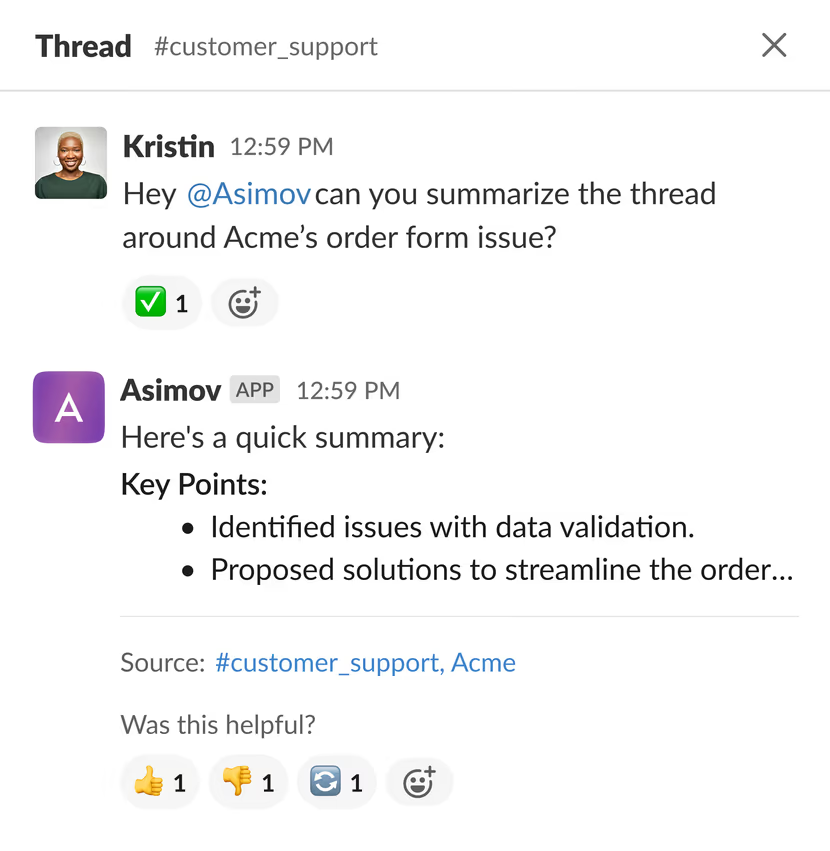
Summaries and answers pulled from long Slack threads
Why: people had to scroll through long threads to find one detail, because Slack’s search couldn’t surface it.
My approach: the problem was already too many tools, so I kept the pilot entirely inside Slack. Anyone could ask Asimov to summarize a thread or pull out a specific answer with its context, much like today’s AI meeting notetakers.
No configuration hub in the pilot. Adding Asimov to a channel was the whole setup, so we could test whether its answers were useful before building anything around it.
Release 2
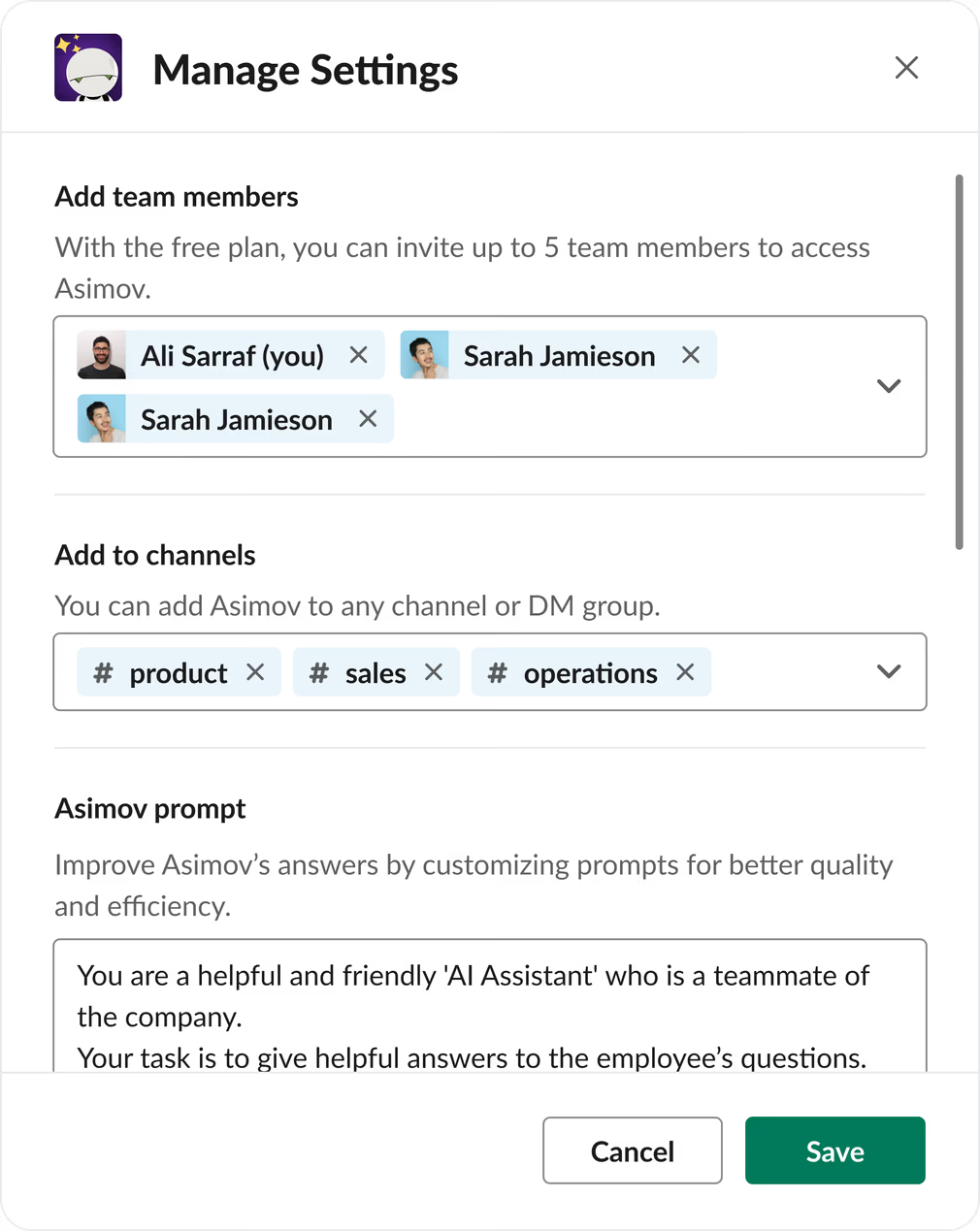
Admin-only setup and rules for what Asimov could reveal
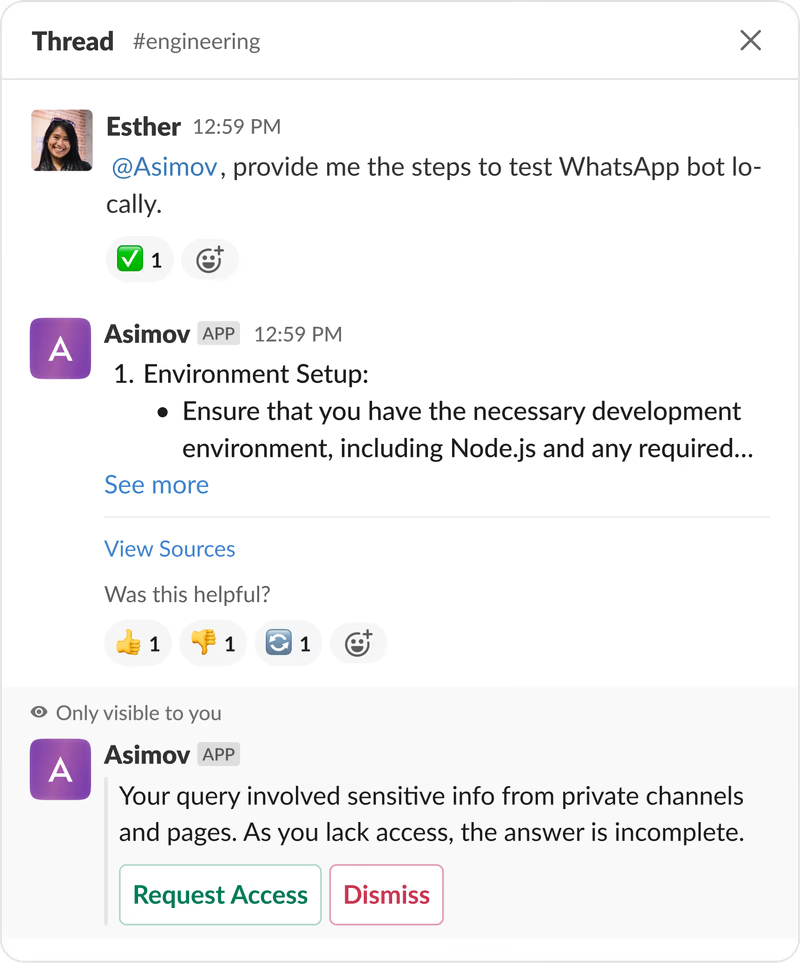
Why: an AI agent reading team conversations needed guardrails from day one, so I pushed for permissions right after the pilot.
My approach: I split the problem in two. Who could change Asimov needed a fast answer: only Slack workspace admins, who were already accountable for the workspace. What Asimov should say was harder, since it could read things the person asking wasn’t allowed to see. I designed a response model in Slack for those cases, covering different roles and permission clashes.
The response model is the decision I’m proudest of. It set the base for handling roles once teams were ready to share more.
Release 3
Connecting company docs as knowledge sources
Why: channel history only went so far. Research showed teams needed answers from company docs too, so I pushed for knowledge sources next.
My approach: I designed the first configuration flow around one idea: admins control what the agent can read and use. They picked sources and channels, saw each source’s sync status and could re-sync or schedule syncs. Each integration showed what data Asimov could read. My bet was that control would build confidence, and confidence would drive adoption.
I limited Asimov to public information. Teams in early 2024 were wary of giving an AI private data, so I parked private sources for later and let trust build first.
Integrations shipped alongside, since connecting an app like Notion is what makes it a knowledge source.
Release 4
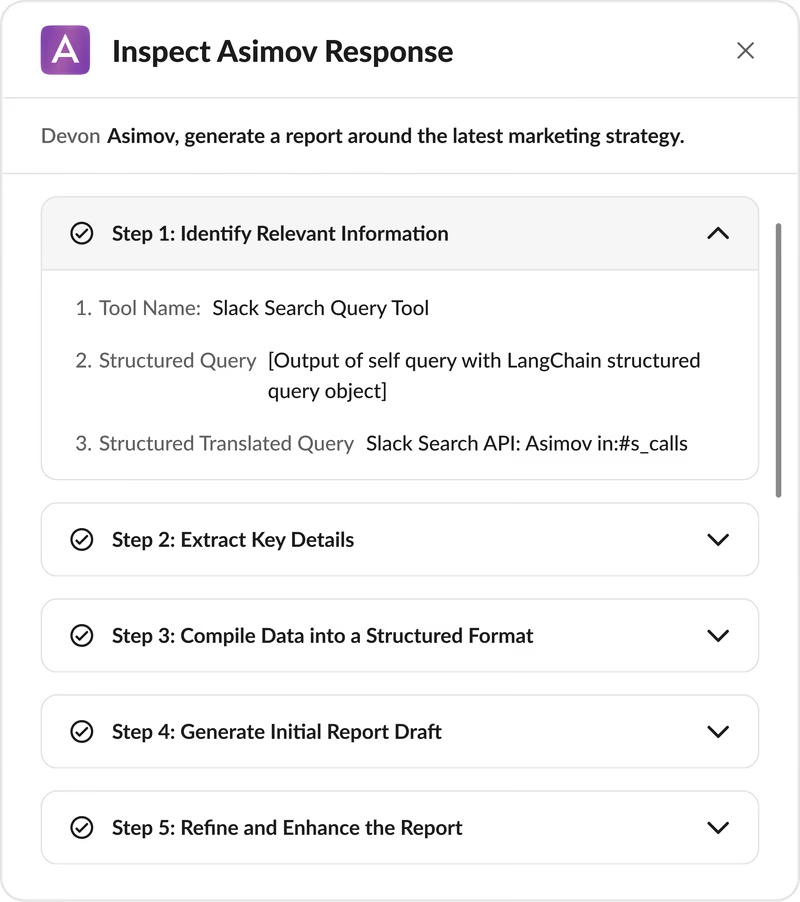
Two ways to check every answer Asimov gave
Why: once Asimov answered from company docs, people needed to check it. AI interaction patterns were still forming in early 2024, and I was convinced an agent holding team information had to show its sources to be trusted. I pushed for this release.
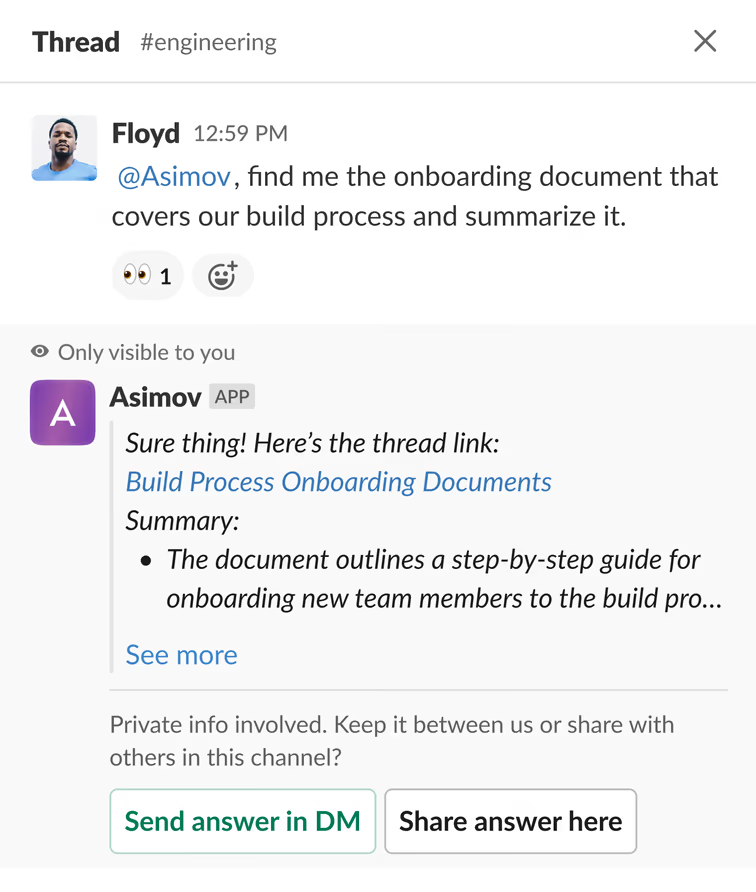
My approach: I designed two ways to verify an answer: the sources Asimov used and the steps it took. Together they covered both ways an answer could go wrong. A hallucination got a thumbs down with optional feedback, and stale information got fixed by updating the source. The same thumbs up and down gave us the 86% helpful score.
This is where repeat questions dropped. Asked about a past API failure, Asimov linked the original thread, and the engineering lead didn’t have to explain it again.
Release 5
Custom actions to trigger work in other tools from Slack
Why: research surfaced one clear automation opportunity: with a situation’s full context, Asimov could let teams trigger every related task from Slack. The CTO pushed for Actions next.
My approach: letting an AI act in other tools raised the stakes, so we piloted custom actions first and I kept them simple on purpose. Teams wrote their own through a configurable schema. Tars’ CEO set up /linkedin to have Asimov draft a LinkedIn post in his voice whenever a developer announced a release. This let us test whether Asimov acted safely before anyone connected their own tools and APIs.
I designed built-in actions for connected tools as the next step, so admins could switch actions on or off for each app. They never shipped, but they held to the principle behind every release: admins decide what Asimov can do.
Action configuration
Writing a custom action
Asimov pulling an answer from a connected app
Design system
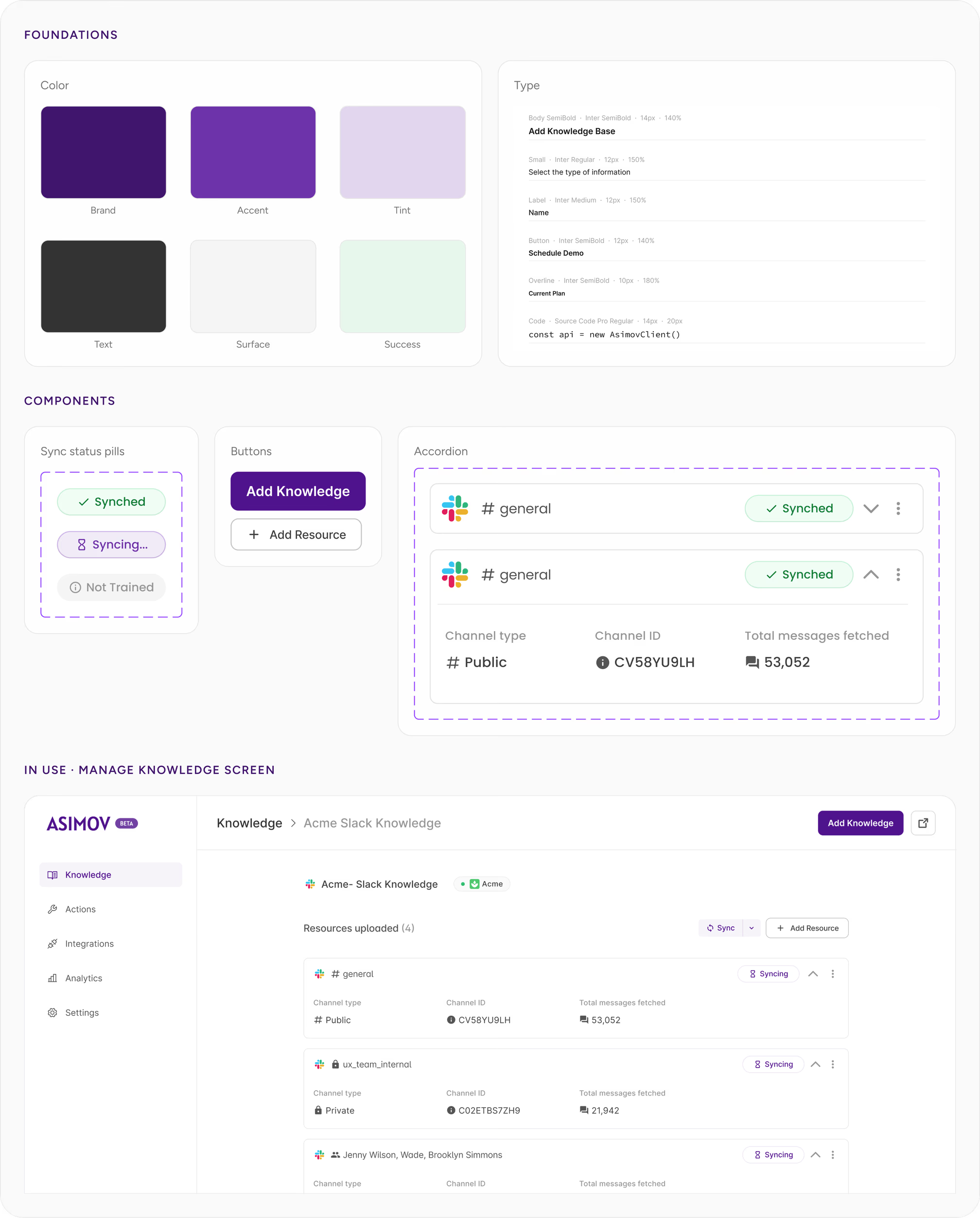
Building the design system that cut handoff-to-release time by ~60%
I held off on a design system until Asimov needed its own interface. From then on, every release added more screens.
I started with the components: 20+ of them, with 90+ variants covering every state a screen could show. They carried the product’s rules too. The knowledge accordion had a variant for each Slack channel type, and sync and training status showed admins where each source stood. I later formalized the system into 100+ tokens.
Once it was built, a new design went from handoff to release in about two days, down from at least a week. Its core components later moved into Tars’ main product, restyled to match.
Reflections
What I'd take into the next project
Ship a first version of the future, even a small one
I parked access to private sources, with roles deciding who could see what, as future scope, and every required update pushed it further back. Next time I'd put a first version of that layer into the release cycle, even one that simply mirrored Slack's permissions, so it already had a place in the product.