The Platform
What Tars builds and why it's complex?
TIMELINE
Oct 2022
INDUSTRY
B2B SaaS
ROLE
Product Designer
TEAM
CS Team (4), CTO, CEO, Developers
Tars is a bootstrapped B2B startup building enterprise AI Agents for clients across banking, insurance and healthcare. The product is a visual builder, think of it as a flowchart editor where each node is a single conversational turn. Tars calls these nodes gambits.
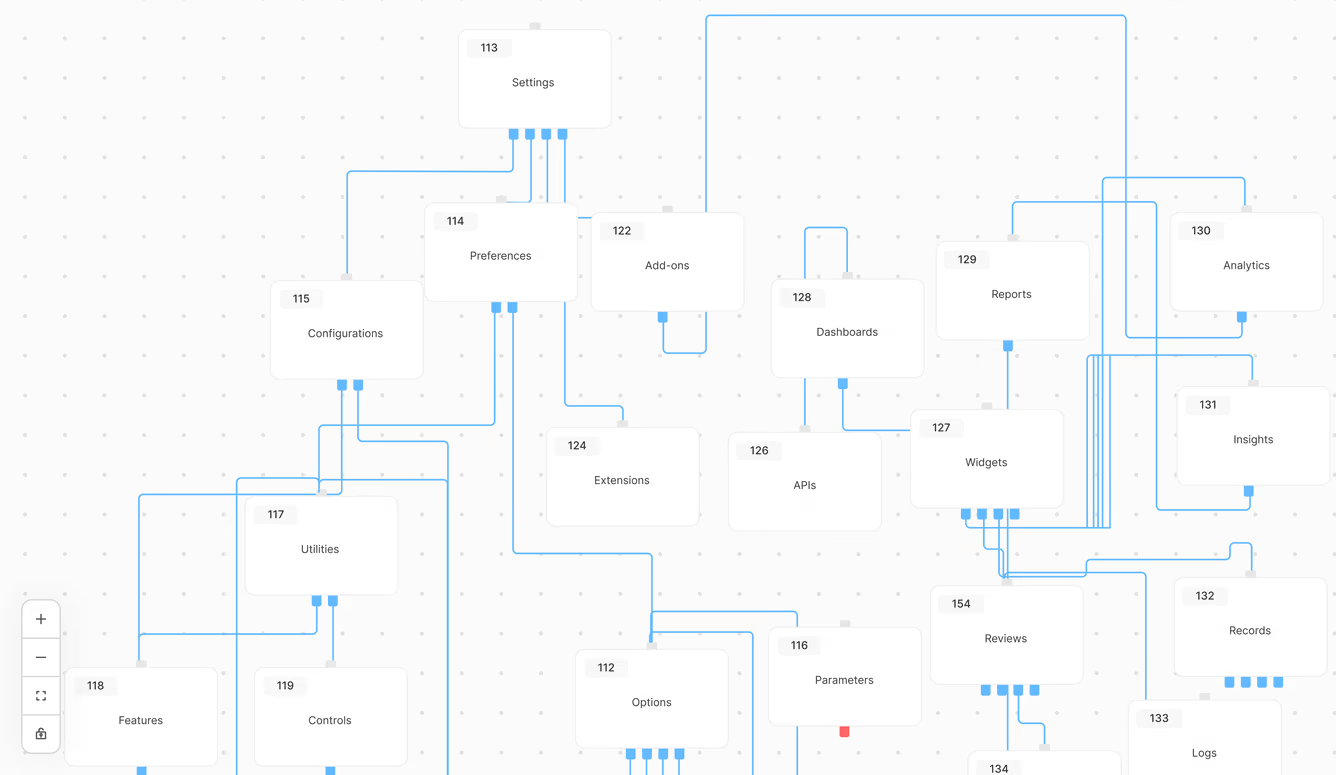
A simple customer service bot might have 20 gambits. An enterprise banking chatbot on the other hand could have 500, each connected through branching paths, button or card inputs and live API calls.
As these workflows scale, so does the difficulty of understanding them. When something breaks, teams need to trace the exact path a conversation took, identify where it failed, and understand why.
Debug Mode was built to make this visible. It would allow teams to do a test run of the conversations, inspect each gambit and then quickly identify any failures within the complex, branching system.

A collection of gambits with nodes branching to other gambits.
The background
This feature has to work for two completely different users.
During one of the product team standups, the CTO flagged a pain point. The CS team was spending hours debugging chatbots, often getting stuck trying to identify a broken gambit in a 500+ gambit canvas. When I observed their workflow directly, I saw the real problem was mechanical. They'd manually step through the chatbot flow, lose track of where they were, scroll back to the beginning and then start over. The process was draining and error-prone.

The 'Make' section of Tars. Having 250+ gambits displayed on the canvas can quickly become overwhelming.
The constraint that emerged with this project was non-negotiable. I needed to design one interface that could work for the CS team (who could read API errors and JSON) while also eventually scaling to clients with no technical background. Two completely different mental models supported by one feature.
That dual-audience tension shaped everything that followed. The interface had to surface depth for the technical path but never clutter the layman's clarity.
Here's what shipped and the story of every decision visible in this screen.
The debug panel sits beside the builder canvas in the preview panel. Once the debugging starts, the canvas follows the active gambit throughout the conversation. The gambit currently being tested through the debugger would be in full opacity, with a soft blue glow behind it. All the other gambits would be at a 40% opacity.
Since a gambit can have multiple paths, the debugger would follow a default path set in the gambit controls. The active path would be shown by a dashed line. The debugger panel had 3 controls- Start/Pause, Stop and Restart. A status message would denote the state of the debugging. However, the journey to this this shipped design came at the cost of some decisions.
The shipped 'Debug Mode' feature, introduced to reduce testing time by the internal team and clients.
Design Decision 01
The canvas was overwhelming with three different visual signals. One was enough.
As the debugger runs, the canvas automatically zooms to the active gambit and follows the conversation flow. The active gambit stays at full opacity. Everything else drops to 40%.
However, the journey to this shipped design came at the cost of some decisions.
Iteration 1: Color-coded states
before

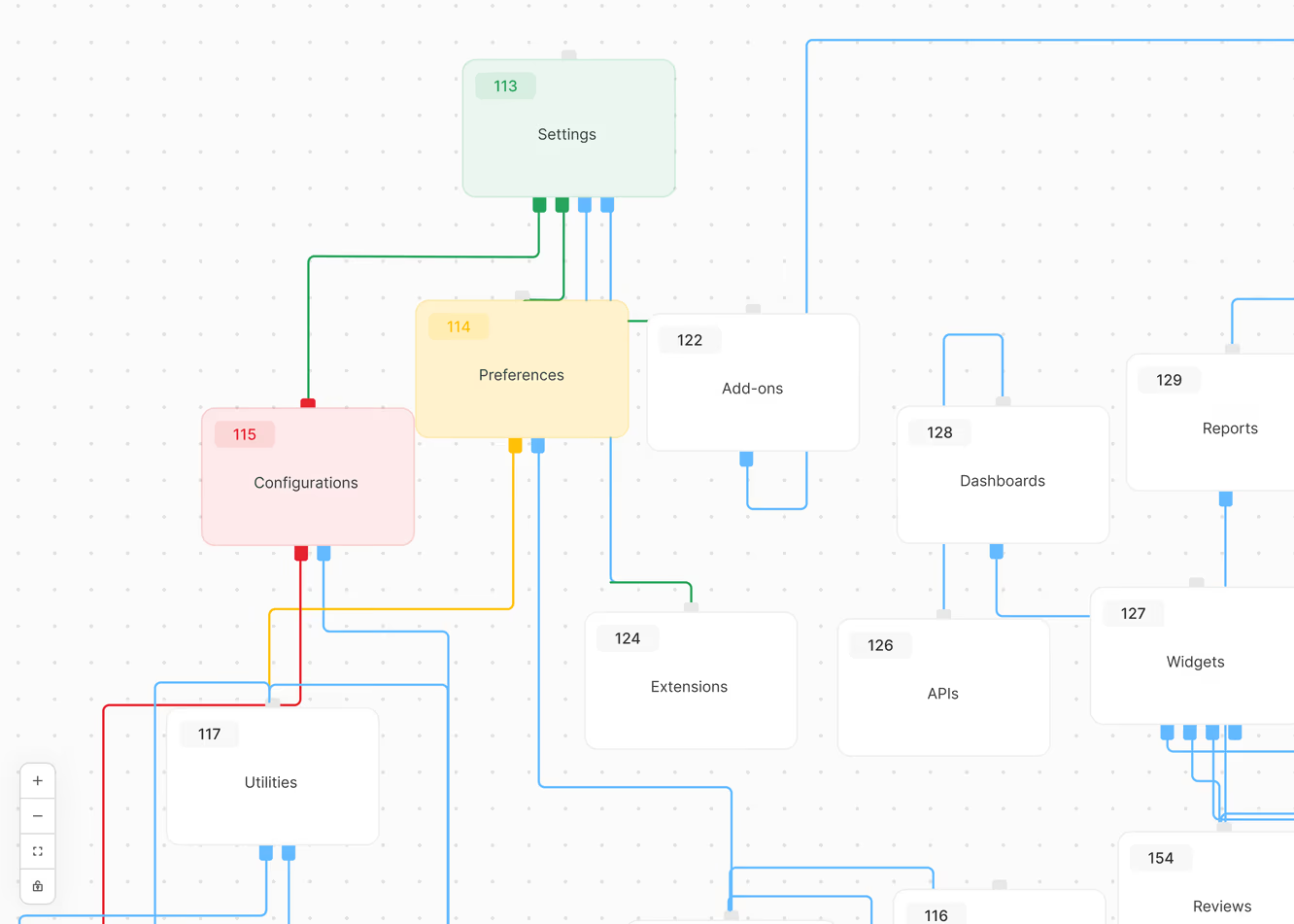
My initial design of color-coding the gambits based on their debugging state.
The first version used colors- yellow for active, green for passed and red for error. This was logical on paper but the problem showed up on a real canvas.
500 gambits, with some overlapping, now covered in green and yellow and red on top of the existing blue. This made a canvas that was already hard to navigate, harder. The color system was asking the canvas to communicate three things at once when the user only needed one: where is the debugger right now?
Iteration 2: Single color, dashed lines and a glow
shipped
233/253 Gambits Tested
5 Gambits with Error
Active state
100% opacity + subtle blue glow
Inactive state
40% opacity, no color change
Path signal
Dashed and moving connector lines
Navigation
Auto-zoom follows active gambit
One signal. That's all the users would need. So instead of having too many differentiating points, I simplified to one. I stuck to the default blue, and instead used opacity levels to denote change.
The active gambit gets a subtle blue glow on top of the opacity change. It uses the same blue as existing canvas elements, just amplified. Dashed connector lines show the path the debugger is taking, so the user can see which branch the conversation will follow before it gets there.
The original design required the users to pan through the flow to understand the test health. I've refined the design to surface this immediately- the pills at the top show total gambits tested and error count in one glance. This shifts the mental model from "navigate the flow to find problems" to "confirm status, then drill in."
the conflict
The CS team's feedback led to a more simplified design
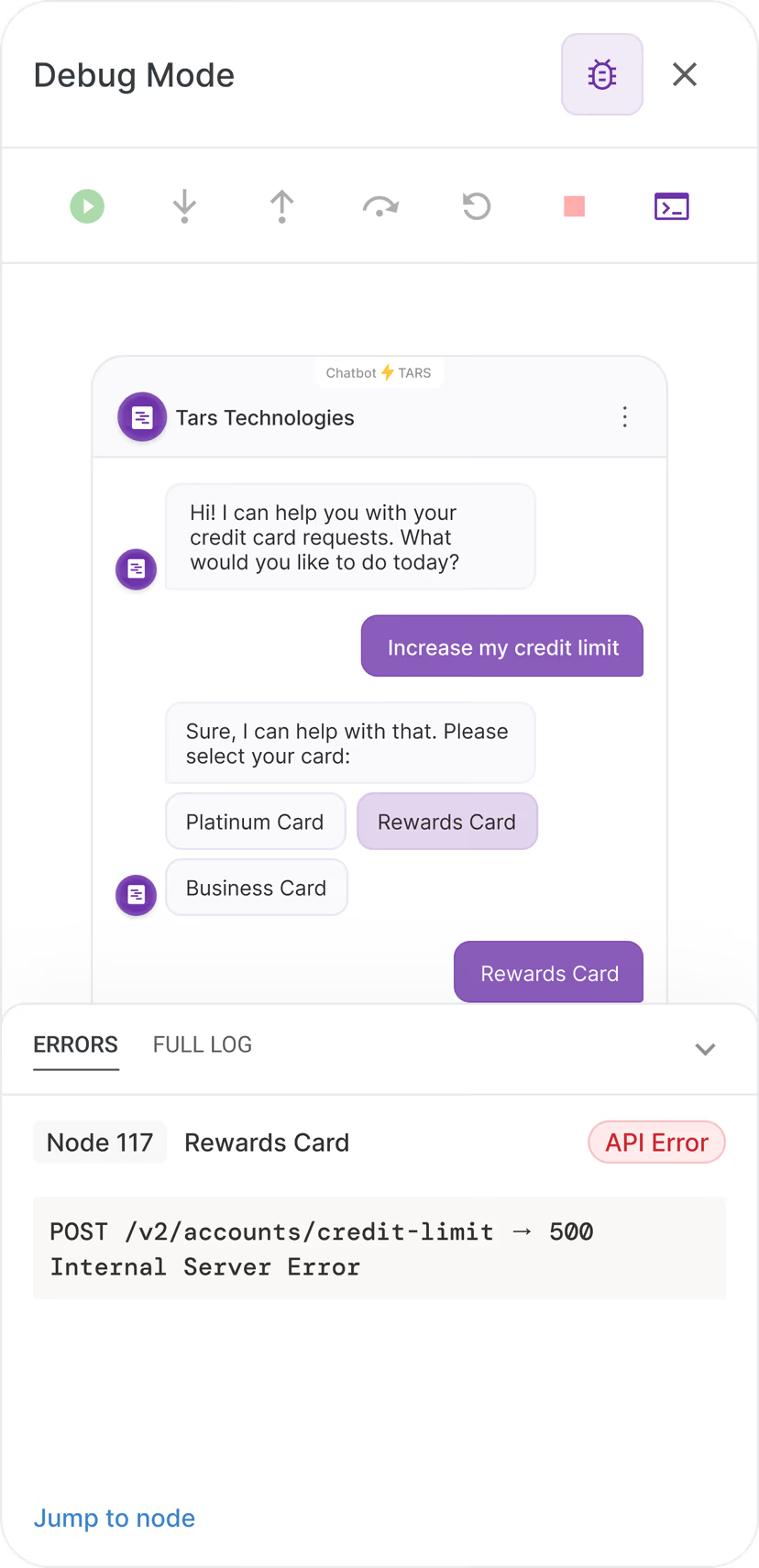
With the canvas resolved, I turned to the control panel. I modeled the first version on IDE debugger interfaces, the environment the CS team was most likely familiar with. Six controls: play/pause, stop, step into, step out, step over and see logs.
Step into would let a user drill into a single gambit's internal logic, testing each input separately. Step out returned to the main flow. Step over skipped a gambit and moved the debugger forward. A terminal log panel sat beneath the canvas, surfacing error output the way a code editor does.
"The CS team understood the terminal immediately. Step into, step out and step over stopped them."
I could explain the functions and they'd follow the logic. But in the middle of actually debugging something, the controls created hesitation.
The CS team were the most technically fluent users this tool would ever have. If they were pausing, a client with no development background would be even more confused.
Iteration 1: Six controls and a log panel
before

This hesitation was the feedback we needed and a roadmap conversation happening at the same time made the answer clear:
"An SMB client managing their own chatbot and an enterprise client with a dedicated engineering team needed different things from this tool. The advanced controls weren't wrong, they were just intended for a different release."
Design Decision 02
Shipping a simpler version was the right call
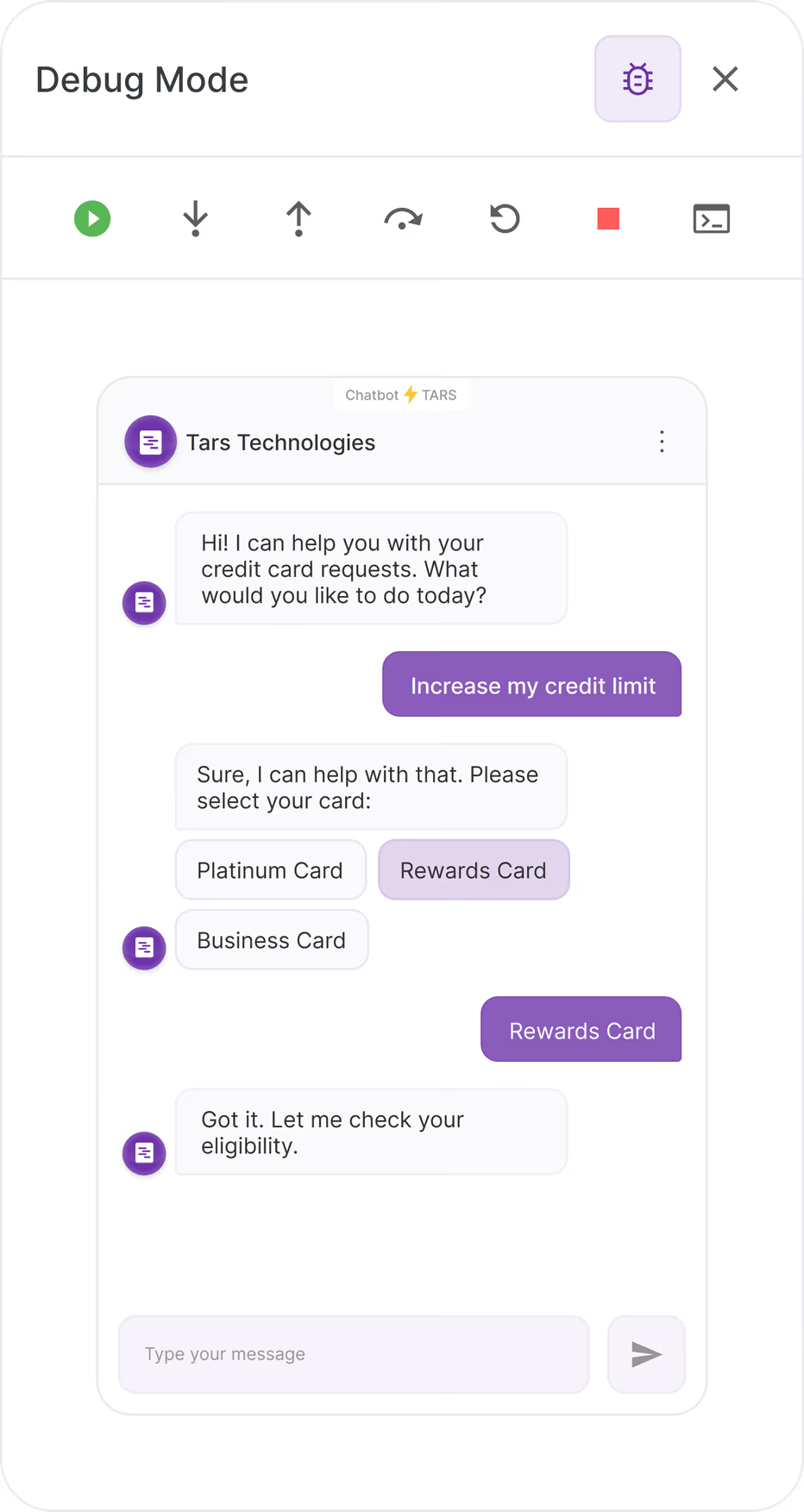
Iteration 2: play/pause, stop and restart
shipped
I stripped down the design to make it more layman-friendly. Instead of six controls, I kept it to just three- play/pause, stop, restart. Additionally, the status messages, debugging in progress, paused, stopped, would remove any ambiguity about what's happening without requiring the user to understand the canvas' intricacies at an important moment.
impact
Adopted by the team the day it shipped. Testing time cut by ~50%
After the first release, the CS team incorporated the Debug Mode into their standard workflow. The task that was causing hours of manual work became a routine step. This quote from Ish the CEO of Tars, during one of our monthly team calls, talking about the Debug mode, really conveyed the impact it had on the CS team:
"I was sitting beside [CS team lead] this morning and he was running the Debug Mode for [healthcare client]. To see the debugger running, the canvas following the conversation flow, the gambits changing states, was amazing. I saw the debugger stop and we found that the gambit's API was broken and it wasn't returning the call. This was gambit number 273."
Reflections & Learnings
The right answer and the complete answer aren't always the same thing
In hindsight, the design with six controls was doing too much and it didn't need those advanced functionalities.
Within a couple of months of releasing the simplified design, we found that 90% of errors were easily resolved by making a minor change here and there in the gambit controls, or that these errors were caused by API connections and custom code issues. The advanced controls and debug log were nice to think about in terms of feature sophistication, but wouldn't have been needed in the long-term and would have become obsolete.
The biggest takeaway for me from this project is that as a designer, you really have to account for what is actually needed. It is easy to get carried away and add more to a design but sometimes, Occam's razor is the right answer.